Wireless Presentation Clicker for PowerPoint Presentations, USB Dongle Presenter Remote with Laser Pointer Slide Clickers for Mac/Windows/Linux, Computer/Laptop, Google Slide/PPT/Keynote Battery
Brand: CLIKBUTM
ASIN: B09X1G5DCC ✓ Copied!
PASIN: B0BF9FHST1
Price: $14.99
About this item
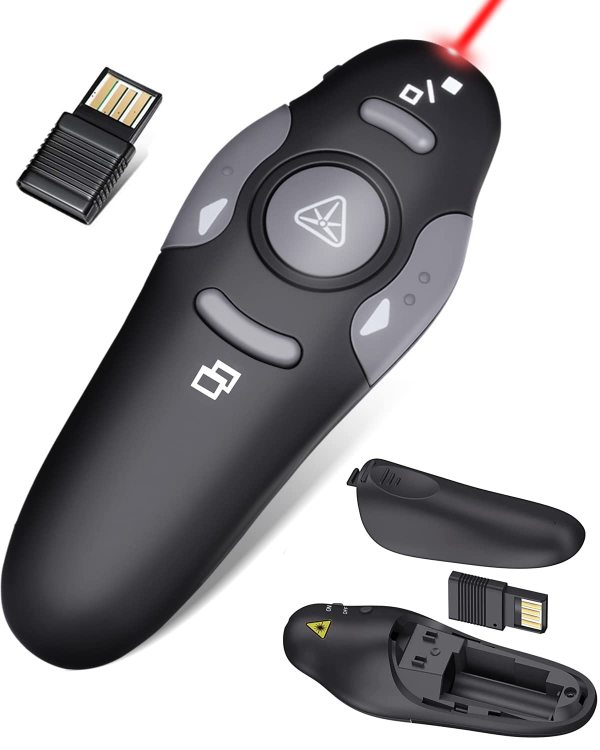
- 【Amazing Ergonomic】Wireless presentation clicker for PowerPoint presentations has a cool ergonomic design that makes you more comfortable when you use it to switch PPT, Keynote or Google Slides. The dark gray buttons and black body convey the designer's philosophy of simplicity. CLIKBUTM PPT clicker can used in different occasions such as teaching, office, conference, speech, etc.
- 【Compact Design】The USB dongle is stored in the slot inside the battery compartment of the remote powerpoint clicker with laser pointer. Easy to carry, remote presentation pointer's size: 109mm, Weight:38g (Battery included). Wireless presenter remote with laser pointer fits easily in your pocket or bag.
- 【How to Use】No drivers required. Just plug into the USB dongle, press the connect button on the back of the presentation remote, then start clicking. Supports systems: Windows 2003, XP, Vista, 7, 8, 10, Mac OS, Linux; supports softwares: Keynote, Google Slides, MS Word, Excel, PowerPoint, Website, PDF.
- 【Just Need 1 AAA Battery】No special button cell battery. Just one AAA Battery you can switch your PPT in classroom or office. One AAA battery can last about two months. Tip: you need to remove the film of the battery when start using power point remote clicker with laser out of the box.
- 【100FT Control Distance 】Slide clicker with laser pointer for presentations control distance: 98FT/30M, laser pointer light range: 328FT/100M. You can say goodbye to boring typical teacher pointers for classroom.We have the coolest computer clicker for presentations control that will rock your presentations and ensure your crowd is always engaged!
Core Selling Points Analysis
🎯 Plug-and-play, compatible with multiple systems and mainstream software
🎯 USB receiver built-in storage, lightweight and portable
🎯 Cool ergonomic design, minimalist business style
Pros & Cons Analysis
Product Pros
-
Broad Cross-Platform Compatibility
Supports mainstream operating systems like Windows, Mac OS, and Linux, as well as various software including Word, Excel, and PDF, offering compatibility that surpasses many specialized competitors. -
Plug-and-Play, Easy Setup
No driver installation required; simply plug in the USB receiver and press the connect button to use, significantly reducing the user's learning curve and time investment. -
Built-in Storage for USB Receiver
Ingeniously designed with the USB receiver stored inside the battery compartment, effectively preventing loss and greatly enhancing the product's portability and convenience. -
Powered by Universal AAA Batteries
Uses common and easily obtainable AAA batteries, avoiding the hassle of sourcing special batteries, with a single battery lasting approximately two months. -
Wide Control Range
Presentation control distance up to 30 meters and laser pointer range up to 100 meters, providing ample freedom of movement for users presenting in large venues.
Product Cons
-
Durability Concerns for Some Components
User feedback indicates that the USB receiver and certain functions (e.g., slide scrolling, clicking) are prone to damage or instability, affecting long-term reliability. -
Subpar Core Function Performance
Multiple users report occasional malfunctions with the slide switching function, directly undermining the usability and user confidence in the presentation pointer as a core tool. -
Lacks Built-in Rechargeable Design
Relies on replaceable AAA batteries, presenting a disadvantage in terms of environmental friendliness and long-term convenience compared to the increasing number of competitors with built-in rechargeable lithium batteries. -
Ergonomic Experience Falls Short
Despite marketing emphasis on ergonomics, some users report that the actual grip feel does not meet expectations, or the USB receiver size is too large, making insertion difficult.
🕵️♂️ Are these common issues in the category or isolated cases? View Related Category Analysis for industry-level insights.
Related Category Analysis
Amazon US Market Analysis: Presentation Clickers Category
Portability and compatibility become standard, user experience details determine success. The presentation clicker market has matured. Basic slide advancement, laser functions, and ergonomic design are highly prevalent. Current innovation trends focus on USB-C dual-interface