OOWOLF Monitor Light Bar with Remote, Ra95 Computer Monitor Lamp for Eye Caring, USB Reading LED Task Lamp with Dimming, Dimmable Light Bar with Backlight, No Glare Space Saving Home Office Desk Lamp Pro-Plus
Brand: OOWOLF
ASIN: B0B5D6L3K1 ✓ Copied!
PASIN: B0BCX1J1TF
Price: $24.99
About this item
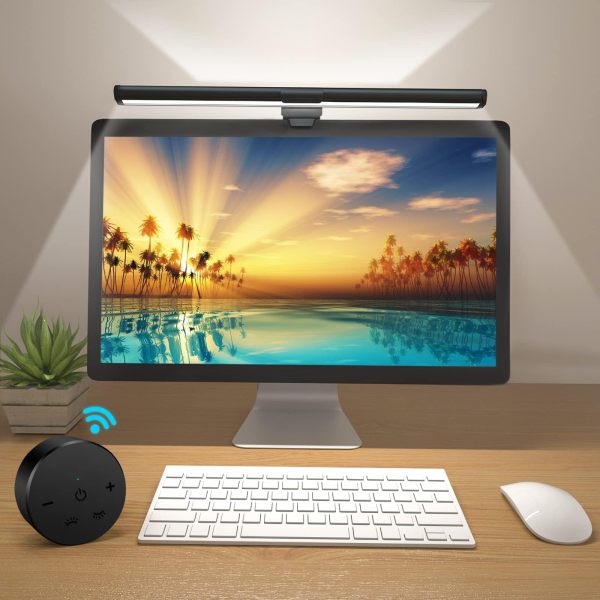
- Why Choose Our Monitor Light Bar? Our monitor light bar suitable for all types of screens. Take your workspace to the next level with the OOWOLF Monitor Light Bar—where optimal lighting meets style, comfort, and functionality. Elevate your productivity and protect your eyes, one click at a time.
- No Blue Light Hazard: Designed with your eye health in mind, the monitor lamp minimizes blue light exposure, reducing eye strain during long hours of screen time. Perfect for those who work or game for extended periods.
- Flicker-Free Lighting: Say goodbye to screen flickers and eye discomfort. The advanced flicker-free technology ensures a smooth, consistent light output that won’t cause strain, allowing you to focus longer without interruptions.
- High CRI (≥95): Enjoy vivid, true-to-life colors with exceptional color rendering. This monitor light bar ensures that the colors on your screen appear more vibrant and realistic, providing a superior visual experience.
- Adjustable Color Temperature (6500K to 3100K) & Stepless Dimming: Easily switch between cool white for focus and warm white for relaxation with a simple press of the remote control. Whether you're working, gaming, or watching content, find the perfect lighting for every task.And the computer monitor light remembers your last brightness setting, so you never have to adjust it again.
- Convenient Backlight Feature: A stylish and practical backlight feature enhances the overall visual appeal of your setup, providing a soft glow that reduces harsh contrasts between the screen and surrounding environment.
- Remote Control: Effortlessly adjust brightness, color temperature, and other settings from the comfort of your seat. No need to leave your desk or work in discomfort ever again.
- Modern & Sleek Design: Its minimalist design complements any setup, whether you're at home or in the office. The computer light bar attaches securely to your monitor, freeing up space on your desk.
- Perfect for Long Sessions: Designed for comfort, it ensures that your workspace is lit without causing strain on your eyes, even during the longest of sessions.
- Stepless Dimming: With a built-in stepless dimming feature, you can easily adjust the brightness to your liking, creating the perfect ambiance for any task or setting. The light bar remembers your last brightness setting, so you never have to adjust it again.
Core Selling Points Analysis
🎯 Professional eye protection with no glare, high color rendering and high fidelity
🎯 Convenient wireless remote, smart dimming and color adjustment
🎯 Minimalist design saves space, with comfortable ambient backlight
Pros & Cons Analysis
Product Pros
-
Superior Optical Performance
High Color Rendering Index (Ra95) ensures true-to-life colors, and flicker-free technology significantly reduces eye strain, surpassing ordinary lighting standards. -
Dual Intelligent Lighting
Unique backlight design provides ambient lighting effects, while the front main light is glare-free, effectively mitigating screen-to-environment contrast and enhancing visual comfort. -
Multi-dimensional Convenient Adjustment
Offers a wide color temperature range from 6500K to 3100K with stepless dimming, paired with a wireless remote control and memory of last settings for highly personalized use. -
Premium Space Integration
Features an aluminum body with a modern, minimalist design that mounts directly above the monitor, significantly saving desk space and enhancing overall aesthetics.
Product Cons
-
Cable and Touch Control Reliability
Some users report that the included USB-C cable may cause unstable power supply; touch controls sometimes have poor responsiveness, impacting the user experience. -
Inadequate Mount Stability
The clamp spring tension is somewhat weak, potentially leading to slight wobbling or insufficient stability in desktop environments with frequent movement or adjustments. -
Limited Practicality of Cool Light Mode
Although it supports cool white light, some users find its brightness insufficient to effectively serve the eye-protection purpose of this mode, limiting its practical value.
🕵️♂️ Are these common issues in the category or isolated cases? View Related Category Analysis for industry-level insights.
Related Category Analysis
Amazon US Market Analysis: Monitor Light Bars Category
Eye protection and desktop aesthetics are core demands; smart convenience is the new frontier. Demand for monitor light bars continues to grow, with consumers focusing on products that protect eye health and optimize desk space. The market is evolving from basic lighting towa