Phomemo Bluetooth Thermal Label Printer, 241BT 4X6 Wireless Shipping Labels Printer for Small Business, Pink Label Printers for Shipping Package, Compatible with iPhone, Android, Amazon, Shopify, USPS
Brand: Phomemo
ASIN: B0BTYD7H28 ✓ Copied!
PASIN: B0FFMQS6NL
Price: $69.99
About this item
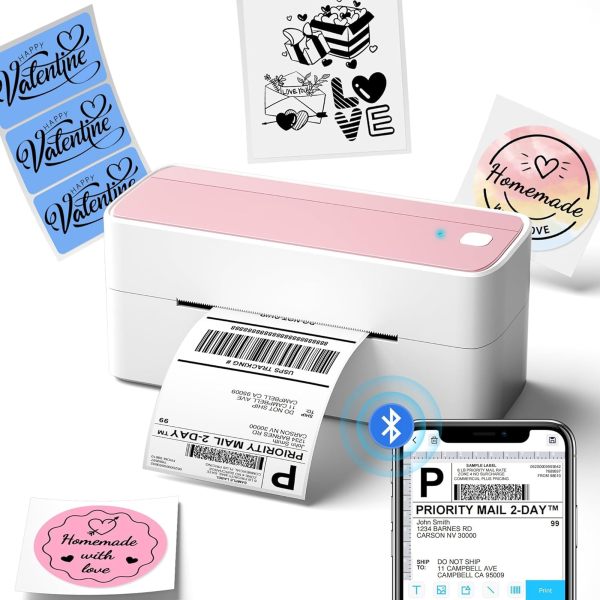
- [Print Via Bluetooth] - Phomemo bluetooth shipping label printer supports wireless printing through bluetooth connection. For IOS and Android mobile Phone, need to download the "labelife " APP from Apple Store or Google Play. With easy and simple operations, you can easily print your logo, labels, and more, making your life more convenient! Note: All devices cannot be directly connected to Bluetooth and need to be used through the app
- [Print via USB Cable] - For PC, Windows, Mac OS, Chrome OS, and Linux systems. For Chrome OS, need to enter “Labelife” in the Chrome web store and add the extension to your Google Chrome. (PC printing needs to download the driver: labelife.net/pm241)
- [Multi-Platform Compatibility] - This shipping label printer supports label widths from 1 to 4.6 inches, making it ideal for printing labels from major platforms like eBay, Shopify, Amazon, Etsy, UPS, USPS, FedEx, and more. Easily print text, barcodes, QR codes, forms, and use pre-made templates for home or business. Note: The printer supports black-and-white printing only. For color labels, purchase compatible thermal color label paper separately.
- [Money and Time Saver] -Phomemo label printer utilizes advanced thermal direct technology for printing, eliminating the need for expensive toner or ink. With a printing speed of 150 mm/s, the printer can produce up to 72 sheets of 4x6 labels per minute. Additionally, the 203 DPI resolution ensures that the printing is clear and precise. With this printer, you can save precious time and money, making it an ideal choice for your labeling needs
- [Professional Team] - Phomemo support team provides technical support, including live chat, phone calls, emails even remote desktop operation. If you have any questions or concerns about our Bluetooth shipping label printer, please don't hesitate to let me konw. Phone Call: (9:00-17:00 Mon-Fri EST) Email/ Live Chat: (19:30-4:30 Mon-Fri EST)
- Phone and Tablet Start Print - Step 1: Download the App 'Labelife'. Step 2: Turn on the 241BT printer and your phone's or tablet's Bluetooth. Step 3: Click the 'Printer' icon in the App to search for the 241bt label printer, connect it via Bluetooth in the App, and select the paper size and file type to start printing
- Laptop/PC Starts Printing - Step 1: Please check your laptop/PC's operating system (OS) and download and install the correct 241bt driver from the website (labelife.net/pm241). Step 2: Use the USB data cable to connect the 241bt printer to your computer. Step 3: Select and open your document, and choose 241bt from the printer list.
Core Selling Points Analysis
🎯 Bluetooth wireless printing, multi-system compatibility for phone/computer
🎯 Thermal technology requires no ink, high-speed and precise, saving costs
🎯 Broad platform compatibility, adapts to various label sizes
Pros & Cons Analysis
Product Pros
-
Extensive Compatibility
Comprehensively supports mainstream operating systems (iOS/Android/Windows/Mac/Linux) and major e-commerce/logistics platforms, covering the vast majority of small business user scenarios. -
Wireless Connectivity Convenience
Built-in Bluetooth enables wireless printing from phones/tablets, significantly enhancing operational flexibility and desktop tidiness, superior to competitors that only support USB. -
High-Speed Inkless Printing
Utilizes thermal technology requiring no ink consumables, combined with 150mm/s high-speed output, significantly reducing operational costs and improving label printing efficiency. -
Professional Customer Support
Offers diversified technical support including online chat, phone, email, and even remote assistance, providing users with robust after-sales service to enhance trust. -
Unique Aesthetic Design
Provides multiple color options like pink, offering personalized choices for small businesses or individual users compared to the common industrial black printers on the market. (Inferred based on similar product experience)
Product Cons
-
Label Printing Stability Issues
User reviews indicate inconsistent label printing experiences, with reports of blank labels or label waste, indicating room for improvement in the stability of this core function. -
Single-Color Output
Only supports black-and-white printing, limiting specific applications requiring color labels or more visual effects, lacking broader printing versatility. -
Fan-Fold Label Jamming
User feedback suggests fan-fold labels can jam or feed poorly if not precisely aligned, affecting the continuous printing experience. -
High Dependency on App/Drivers
Requires a specific app for mobile and driver downloads for PC, adding some complexity to initial setup and troubleshooting. -
Non-Top-Tier Resolution
203 DPI resolution is sufficient for daily label printing, but does not offer an advantage in detail compared to some 300 DPI high-end models on the market.
🕵️♂️ Are these common issues in the category or isolated cases? View Related Category Analysis for industry-level insights.
Related Category Analysis
Amazon US Market Analysis: Thermal Shipping Label Printers Category
Wireless connectivity is becoming standard; convenience and efficiency are the main themes. Demand for wireless Bluetooth connectivity, multi-system compatibility, and high-speed, consumable-free printing continues to grow in the thermal shipping label printer market. Consume