Amazon US Market Analysis: Electronic Reading Remote Page Turner Category
📊 Executive Summary
📈 Market Trends
Portable and comfortable reading is mainstream, but product homogenization is severe. The electronic reading remote page turner market is growing rapidly due to its core value of hands-free, enhanced reading comfort. Consumers generally pursue compactness, multi-device compatibility, and long battery life. However, market product functions are converging, with competition focused on price and detail optimization, leaving opportunity for brands with genuine innovation and reliable quality.
⚡ Major Pain Points
Exaggerated battery life and compatibility traps are user trust killers. The biggest product flaws currently are widespread exaggeration of battery life and unstable quality, with many users reporting charging faults or device failure within a short period. Secondly, claims of 'broad compatibility' do not match real-world experience, especially with iPad/iPhone and thick case adaptation. Additionally, the lack of a 'back page' function, and the need to re-pair after auto-sleep also severely impact users' smooth reading experience.
💡 Selection Opportunities
Return to core value, deliver on quality and service. Selection opportunities lie in solving the user trust crisis regarding core functions (page turn stability), compatibility, and durability. Specifically, consider developing: 1) An 'Intelligent Reading Remote with Bidirectional Page Turn' to enhance reading completeness; 2) An 'Extremely Stable & Highly Compatible Case-Friendly Page Turner' to eliminate adaptation anxiety; 3) A 'Transparent Battery Management & 3-Year Warranty Page Turner' to build quality trust; and 4) A 'Seamless Connection Page Turner with Instant Wake from Sleep' to optimize user experience fluidity. By ensuring reliable basic functionality and delivering sincere quality and after-sales service, brands can achieve premium positioning and market breakthrough.
I. Analysis Overview
1.1 Introduction & Report Scope
This report analyzes the 'Remote Controls' category (specifically, Electronic Reading Remote Page Turners) in the Amazon US market, focusing on target user personas, core needs, decision drivers, market communication, and potential opportunities.
1.2 Category Snapshot
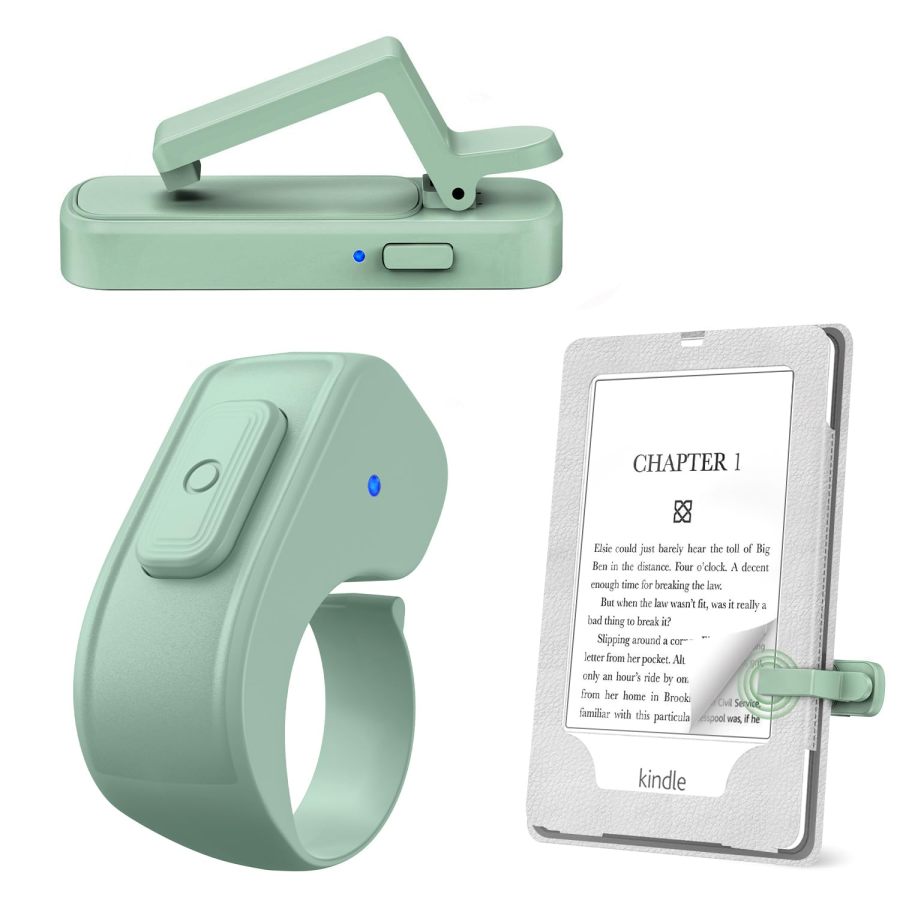
An electronic reading remote page turner (also known as a Kindle page turner) is an auxiliary tool specifically designed for electronic reading devices (such as Kindle, Kobo, iPad, smartphones, etc.). It typically consists of a receiver clipped to the device's screen edge and a handheld/ring-style remote. It enables remote page turning by simulating physical touch or using RF wireless technology, aiming to free the user's hands and enhance reading comfort and convenience, especially suitable for use in bed, on the sofa, or when hands are otherwise occupied. Some products also integrate a camera shutter function. The following table illustrates the key characteristics of consumer behavior in this category.
| Dimension | Segment | Description |
|---|---|---|
| Need Driver Type | Planned Purchase/Habitual Purchase | Users are typically long-term readers with a clear need to enhance reading comfort and convenience; or, after forming the habit, it becomes a daily necessity. |
| Purchase Frequency | Low Frequency | As an electronic accessory, its purchase frequency is low. One purchase usually satisfies long-term use needs, with a long repurchase cycle unless damaged. |
| Decision Complexity | Medium | Consumers compare based on factors like compatibility, functional stability, battery life, and price, but do not conduct in-depth research. |
| Price Sensitivity | Medium | Price is an important consideration in the decision, but users are willing to pay a reasonable premium for significant experience upgrades, pain point solutions, or proven reliability. |
| Emotional Dependency | Medium | The product primarily provides functional benefits but also delivers emotional value like relaxation, pleasure, and peace of mind by freeing hands and enhancing reading comfort. |
II. User Personas & Usage Scenarios
2.1 Immersive Home Reader
🎯 Users who love reading e-books or comics for extended periods in comfortable home environments (like bed or sofa), pursuing ultimate relaxation and uninterrupted experience.
| Typical Usage Scenarios | Core Pain Points | Primary Purchase Drivers |
|---|---|---|
|
|
|
2.2 Multitasking Pro
🎯 Users who wish to efficiently and conveniently continue reading or using electronic devices while engaged in other activities (like cooking, exercising, holding a child).
| Typical Usage Scenarios | Core Pain Points | Primary Purchase Drivers |
|---|---|---|
|
|
|
III. User Needs Hierarchy (KANO Model)
3.1 Basic Needs (Must-Haves)
- Stable Forward Page Turn: The product can reliably and accurately respond to remote commands, turning pages forward without malfunctioning or skipping pages.
- Mainstream Device Compatibility: Supports the vast majority of mainstream e-readers (e.g., Kindle Paperwhite, Oasis, Scribe, Kobo) and capacitive-screen tablets/phones.
- Easy Installation: The clip design is easy to install and remove, stays securely in place without slipping, and has simple operational logic requiring no complex setup.
3.2 Performance Needs (Linear Satisfiers)
- Long Battery Life: The remote and receiver provide weeks to months of use on a single charge, minimizing the hassle of frequent charging.
- Quiet Operation: The button design is soft and quiet, producing no noise to disturb others in quiet environments like at night or in public libraries.
- Does Not Block Screen: The clip design is slim and reasonable, ensuring it does not block any text or key display areas when attached to the device.
- Case Compatibility: The clip can accommodate the thickness of common protective cases for e-reading devices, eliminating the need to remove the case before reading.
3.3 Excitement Needs (Delighters)
- Bidirectional Page Turn: The remote supports both forward and backward page turning, providing a more comprehensive and flexible reading control experience.
- Clear Battery Display: The remote or receiver has a clear digital or multi-level battery indicator, allowing users to intuitively know the remaining charge to avoid sudden power loss.
- Magnetic Integrated Storage: The remote and receiver conveniently snap together magnetically for easy storage, loss prevention, and support single-cable simultaneous charging.
- Multifunctional Expansion (Photo/Video): Beyond reading page turns, also serves as a remote camera shutter for phones/tablets for selfies, group photos, or video recording, adding product value.
3.4 Unmet Needs & Opportunities
-
Poor Page Turn Stability: Users commonly report the remote not responding to clicks, requiring multiple clicks, or the receiver intermittently failing, severely disrupting reading continuity.
User Reviews (VOC) I did encounter a very few times when the click didn't register // Sometimes it does on the first try. Sometimes it's the 7th try.
-
Insufficient Real-World Compatibility: Some products claim wide compatibility, but user feedback indicates they don't work with iPad/iPhone or specific thick cases, and some Kindle models are explicitly incompatible.
User Reviews (VOC) It doesn't work with my iPhone but I believe that's because of its protective case. I only wanted it for my e-reader so I'm still completely satisfied. // This does not work with iPads and iPhones as described.
-
Short Battery Life or Charging Faults: Many users report product battery life falling short of claims, or devices failing to work after charging, even completely failing after weeks of use.
User Reviews (VOC) It stopped working after 1 week even though fully charged. // The piece on that goes in the kindle died and will not recharge.
-
Lack of Back Page Function: Most products only support forward page turning. Users still need to manually touch the screen to review content, failing to achieve a fully hands-free reading experience.
User Reviews (VOC) There is no back button, but that isn't a deal breaker for me. // I wish I could go backwards as well, but that is simply not the way this kind of product functions.
-
Requires Re-pairing After Auto-Sleep: After the device enters sleep mode, reusing it requires manual reconnection or multiple clicks to wake, adding extra steps and impacting instant usability.
User Reviews (VOC) The only real, though still a slight inconvenience, is that the clicker and holder needs to be synched after each time it goes to sleep. // I find that I have to reset it in order to start working again instead of just being able to click the page turning button & have it "wake up" & carry on as usual.
IV. User Decision Drivers
4.1 Key Decision Factors
- Page Turn Accuracy & Stability: Whether the product can reliably and without delay respond to page turn commands is the user's most core demand. Any lag or failure will interrupt the reading experience and cause dissatisfaction.
- Device & Case Compatibility: Before purchase, users heavily consider whether the product is compatible with their specific Kindle/tablet model and its commonly used protective case. This is the basic prerequisite for the product to be usable.
- Ease of Use & Connection Stability: Plug-and-play or simple, quick pairing minimizes learning curve and connection hurdles; the connection must remain stable after pairing, avoiding frequent disconnects or re-pairing hassles.
- True Long-Term Battery Life: Users expect a single charge to support extended use, not frequent charging. The authenticity of battery life claims directly impacts user trust and purchase decisions.
4.2 Secondary Decision Factors
- Clip Design (Non-Obstructive/Slim): Whether the clip is slim, doesn't block text on the screen, and holds securely without scratching the device are key differentiators that enhance user experience.
- Quiet Buttons: In quiet environments or at night, the quietness of the buttons significantly enhances reading comfort by reducing self and environmental disturbance.
- Portability & Storage: Whether the product is compact and lightweight, includes a storage pouch, or has magnetic features for easy daily carrying and management, reducing loss risk.
- Bidirectional Page Turn Function: Adding backward page turning, beyond forward, provides a more complete reading control experience and is an important bonus for some users.
V. Selling Points & Competitive Landscape
5.1 Selling Point Analysis
5.1.1 Standard Features (Points of Parity)
- Hands-Free/Comfortable Reading: Remote operation frees users from frequent screen touching, enhancing posture freedom and comfort, ideal for bed or sofa reading.
- Wide Device Compatibility: Commonly claimed to support various capacitive-screen devices like Kindle Paperwhite, Oasis, Scribe, iPad, iPhone, Android tablets, and Kobo.
- Long Battery Life/Type-C Charging: Built-in rechargeable batteries, mostly using Type-C ports, advertised to last weeks to months on a single charge.
- No WiFi/Bluetooth Required: Often uses RF (Radio Frequency) technology, emphasizing simplified connection-turn on and use, avoiding Bluetooth pairing hassles.
5.1.2 Key Differentiators
- Multifunctional Expansion (Photo/Video): Can double as a remote camera shutter for phones, useful for selfies or video recording, adding product utility.
- Case-Compatible Design: Emphasizes the clip can accommodate thick cases (e.g., 0.47 or 0.73 inches), usable without removing the case, enhancing convenience.
- Quiet Buttons: Specifically highlights quiet button design, suitable for night or quiet environment reading, avoiding disturbance.
- Magnetic Integrated Storage: Remote and receiver snap together magnetically for integrated storage, convenient for loss prevention; some support single-cable simultaneous charging.
- Clear Battery Display: Remote features a digital battery percentage or multi-level indicator light, allowing users to easily see remaining charge.
5.1.3 Unique Selling Propositions (USPs)
- Ring-Style Remote Design: Remote adopts a ring or special ergonomic shape, improving wearing comfort and grip, making it less likely to lose.
- Ultra-Thin Screen Sensor: Claims the clip's front end is ultra-thin, ensuring it completely blocks no screen text, providing a purer reading view.
- Extended Warranty Service: Some brands offer warranties as long as 24 or even 36 months, far exceeding industry averages, to build trust.
5.2 Competitive Landscape
5.2.1 Market Maturity
The electronic reading remote page turner market is in a rapid growth phase, with the product concept widely accepted, but market homogenization is evident. Core functions (hands-free, forward page turn) are standard. Competition now centers on product reliability, compatibility details, authenticity of battery claims, and micro-innovations in added features and design. Prices generally range from $7-$16, placing it in the low-price segment, with some brands attempting to command a premium through design or service differentiation.
5.2.2 Innovation Trends
Current innovation focuses on solving user pain points: 1) Enhancing the physical clip's adaptability and discretion (e.g., ultra-thin sensors, case compatibility); 2) Optimizing connection and power management (e.g., magnetic charging, battery display, more stable RF connection); 3) Providing more comprehensive control (e.g., bidirectional page turning). Additionally, combining the page turner with remote photo/video functions is an exploration of product multifunctionality, though its priority as a core selling point is lower than enhancing the reading experience.
VI. Marketing Claims vs. Reality Check
The table below analyzes the gap between common marketing claims and actual user experiences in this category:
| Dimension | Marketing Claim | User Reality | Verdict |
|---|---|---|---|
| Battery Life & Reliability | Ultra-long battery life, lasts for months on a single charge (e.g., 100 hours/60-180 days), no need to worry about frequent charging. | Users commonly report battery life falls far short of claims, depleting quickly with heavy use. More severely, many products develop charging issues or stop working entirely after weeks or months. | Sellers commonly mislead consumers with ideal lab data or standby times under minimal power mode, failing to deliver on the promise of long-lasting use. Frequent battery failures are a major product quality flaw that severely erodes user trust. |
| Device Compatibility & Fit | Broadly compatible with all Kindles, iPads, iPhones, Android tablets, and cases of various thicknesses. Plug and play. | User feedback indicates many products fail to work properly with iPads/iPhones; specific Kindle models (e.g., 7th/8th gen, Fire HD) are explicitly incompatible; clip fit for thick cases is poor, or users need to manually adjust screen margins to avoid text obstruction. | Sellers oversimplify compatibility issues, failing to account for differences in device systems and physical limitations of cases. Universal claims frequently fail in real-world application, leading to unmet expectations and high return rates. |
| Page Turn Stability | Precise response, easy page turning, enjoy a seamless reading experience. | Users widely report the remote button being unresponsive, requiring multiple clicks to turn a page, or the receiver failing intermittently, even experiencing bugs like automatic continuous page turning. | As the product's core function, page turn stability and accuracy are subpar, directly undermining the user's most basic expectation. Sellers' insufficient investment in optimizing the core functional experience leads to poor user perception. |
Key Takeaway: The electronic reading remote page turner market suffers from widespread parameter exaggeration and experience misrepresentation, particularly regarding battery life, universal compatibility, and some feature descriptions. A significant gap exists between marketing claims and actual user experience.
VII. Supply-Demand Misalignment Analysis
The table below highlights mismatches between seller focus and buyer priorities:
| Dimension | Seller Behavior | User Focus | Verdict |
|---|---|---|---|
| Completeness of Core Function (Page Turning) | The vast majority of sellers only support forward page turning, generally not offering a back page option or requiring complex operations to achieve it. | Users explicitly express desire for a 'back page' function; otherwise, they still need to manually operate when reviewing content, preventing fully hands-free reading. | Sellers fail to provide a complete reading operation logic, showing a clear strategic blind spot in core functionality design that limits user reading freedom. |
| Product Durability & After-Sales Promise | Most sellers rarely mention or lack specific product durability test data and strong after-sales service commitments in their listings. Some listings even contain contradictory battery information. | Users strongly complain about short product lifespan, charging faults, and frequent malfunctions. They are highly concerned about brand quality and after-sales protection, craving reliable products and a worry-free purchase experience. | Sellers generally fail to build trust in product quality. Their collective silence on the durability issue-a major user concern-leads to high rates of low-star reviews and returns, severely hindering long-term brand development. |
| Priority of Multifunctional Expansion (Camera Remote) | Many sellers position the 'camera remote' function as a key selling point, promoting it frequently in titles and bullet points, even categorizing the product under camera accessories. | Users buy page turners primarily for reading. The camera remote function is not a core need, and some users report it's unstable or rarely used, while they remain troubled by more critical reading pain points. | Sellers allocate marketing resources to non-core needs, creating 'self-indulgent' promotions that deviate from the user's primary purchase motivation for a page turner, failing to maximally address their most pressing reading pain points. |
Key Takeaway: Sellers exhibit significant supply-demand misalignment in product marketing, overemphasizing non-core added features (like camera remote) while collectively neglecting users' deep-seated pain points regarding core reading experience (e.g., bidirectional page turning, real battery life) and concerns about product durability.
VIII. Strategic Opportunities & Recommendations
8.1 Intelligent Reading Remote with Bidirectional Page Turn
8.1.1 Target Audience & Pain Points
⚡️ Pain Points Addressed: Lack of back page function; reading continuity is affected.
8.1.2 Action Plan
Add a dedicated 'Back Page' button to the remote, or implement it via gestures (e.g., tilt, double-click). Optimize the receiver to recognize and simulate page turn commands on both left and right sides (or specific areas) of the screen, ensuring smooth, error-free operation.
| Tech Complexity | Medium |
| Cost Impact | Medium Impact |
| Trade-off Warning | Requires more complex touch simulation or RF signal recognition mechanisms, potentially slightly increasing hardware costs and software development time, but no significant physical side effects. |
| Price Band | Only viable above $18.99 |
8.1.3 Marketing Strategy
Emphasize 'Complete Control, Boundless Reading.' Use scenario comparison visuals to highlight convenience for studying, reviewing, or quickly locating content. Can pair with messaging like 'Immersive Reading, Not Missing a Word.'
8.2 Extremely Stable & Highly Compatible Case-Friendly Page Turner
8.2.1 Target Audience & Pain Points
⚡️ Pain Points Addressed: Clip is unstable and falls off easily; incompatible with thick cases; clip blocks screen text; poor real-world compatibility.
8.2.2 Action Plan
Develop patented ultra-thin, retractable, or rotatable clips that ensure no text is blocked when attached and provide a secure fit for cases up to 18.5mm thick or more. Use flexible conductive materials to increase contact area and improve touch simulation accuracy.
| Tech Complexity | Medium |
| Cost Impact | Medium Impact |
| Trade-off Warning | Ultra-thin, highly adaptable clips may require more precise molds and materials, slightly increasing cost. Strong clamping force might exert slight pressure on very thin screen edges, requiring design balance. |
| Price Band | Only viable above $17.99 |
8.2.3 Marketing Strategy
Highlight 'Native Experience, Case-Free Worry.' Provide real-world test videos and comparison images with cases of different thicknesses, showcasing 'Zero Obstruction, Perfect Fit.' Emphasize 'Damage-Free Installation' for both device screen and case.
8.3 Transparent Battery Management & 3-Year Warranty Page Turner
8.3.1 Target Audience & Pain Points
⚡️ Pain Points Addressed: Exaggerated battery life claims; charging faults; lack of battery display; lack of trust in product quality and after-sales service.
8.3.2 Action Plan
Integrate high-quality lithium polymer batteries and a precise digital battery display. Optimize the power management IC to ensure stable charging and authentic battery life. Offer a warranty of up to 36 months, establish a 24/7 customer service channel, and promise quick fault replacement. Ensure the product complies with FCC/CE and other electronic product certifications.
| Tech Complexity | Low |
| Cost Impact | Medium Impact |
| Trade-off Warning | Using higher capacity and quality batteries increases cost and adds minimal weight, but significantly improves user experience. Offering a long warranty requires higher product quality control and assuming after-sales costs. |
| Price Band | Only viable above $22.99 |
8.3.3 Marketing Strategy
Emphasize 'Real Battery Life, No Anxiety' and '3-Year Warranty, Replacement, Not Repair.' Build brand reliability through transparent battery test reports and customer case studies. Position worry-free service as a core selling point, highlighting long-term value.
8.4 Seamless Connection Page Turner with Instant Wake from Sleep
8.4.1 Target Audience & Pain Points
⚡️ Pain Points Addressed: Requires frequent re-pairing after sleep; unstable connection affects instant usability.
8.4.2 Action Plan
Optimize internal firmware to enable the device to instantly wake from sleep with a single click on the remote, eliminating the need for re-pairing. Enhance signal anti-interference capability to ensure stable connection. Consider upgrading to Bluetooth 5.0 for more stable low-power connection (if cost allows).
| Tech Complexity | Medium |
| Cost Impact | Low Impact |
| Trade-off Warning | Optimizing RF communication protocols and low-power wake mechanisms primarily involves software and firmware optimization, with minimal hardware changes and no significant physical side effects. |
| Price Band | Only viable above $16.99 |
8.4.3 Marketing Strategy
Highlight 'Instant Wake, Uninterrupted Reading.' Emphasize 'Say Goodbye to Hassle Reconnection, Enter the Reading World Instantly.' Use demo videos showing the smooth process from sleep to page turn, enhancing user perception of convenience.