Amazon US Market Analysis: Wireless Display Adapters Category
📊 Executive Summary
📈 Market Trends
Demand for wireless display continues to grow, but user expectations for performance and experience are increasing daily. The market is transitioning from 'having the function' to 'how well it works.' Consumers expect more stable, clearer, and more compatible wireless display experiences, especially regarding 4K HD and streaming service copyright content playback. The current market has many homogeneous products, urgently needing breakthroughs in core functionality to meet users' upgraded demands.
⚡ Major Pain Points
False 4K, HDCP content restrictions, and poor connection stability are the core fatal flaws. Users are generally disappointed with the '4K' resolution claimed by products, with actual output mostly being 1080P. Additionally, the inability to play copyright-protected streaming content like Netflix severely limits the product's value in home entertainment. Frequent connection drops, screen stuttering, and audio-video desynchronization seriously impact user experience, leading to generally poor product reputation and high return rates.
💡 Selection Opportunities
Focus on true 4K output and HDCP compatibility, comprehensively enhance connection stability. The real market opportunity lies in investing in R&D to achieve end-to-end 4K@60Hz output and obtaining HDCP copyright licensing to remove streaming playback restrictions, elevating the product to the high-end market. Simultaneously, by optimizing wireless modules and thermal design, thoroughly resolve issues of poor connection stability and device heating. Supplemented with clearer setup guidance and broader device compatibility, a product can stand out in intense competition and win user trust and premium pricing space.
I. Analysis Overview
1.1 Introduction & Report Scope
This report analyzes the "Streaming Media Players" category (wireless display adapters) in the Amazon US market, focusing on target user personas, core needs, decision drivers, market communication, and potential opportunities.
1.2 Category Snapshot
A wireless display adapter is a device that wirelessly transmits screen content from smartphones, tablets, or laptops to TVs, monitors, or projectors. It uses Wi-Fi (e.g., Miracast, AirPlay, Chromecast) or peer-to-peer wireless technology to achieve synchronized audio and video display, aiming to replace traditional HDMI cables and provide a convenient, clutter-free large-screen sharing experience. It is primarily divided into two types: protocol-compatible adapters and HDMI transceivers, widely used in home entertainment, business meetings, and educational training scenarios. The following table illustrates the key characteristics of consumer behavior in this category.
| Dimension | Segment | Description |
|---|---|---|
| Need Driver Type | Planned Purchase / Emergency-driven Purchase | User purchases typically stem from specific usage scenarios (e.g., meeting presentations, home movie watching) or the emergency need to solve existing cable clutter and inconvenient connections. Some are also purchased as practical gifts. |
| Purchase Frequency | Low Frequency | As durable electronic accessories, they are usually a one-time purchase with a long replacement cycle, unless the product fails or a significant technological upgrade emerges. |
| Decision Complexity | Medium | Consumers compare product compatibility, transmission stability, picture quality, latency, ease of use, and price but do not conduct deep technical research. |
| Price Sensitivity | Medium | Price is an important consideration, but users are willing to pay a reasonable premium for reliable connection, smooth experience, and broad compatibility, rather than blindly pursuing the lowest price. |
| Emotional Dependency | Low to Medium | Primarily based on functional needs, but the convenience, the neatness of being cable-free, and the smooth experience of seamless sharing also provide emotional value and a sense of reassurance. |
II. User Personas & Usage Scenarios
2.1 Business Presenter / Educator
🎯 Frequently conducts presentations and sharing in meeting rooms and classrooms, requiring a fast, stable, and highly compatible wireless display solution to enhance efficiency and professionalism.
| Typical Usage Scenarios | Core Pain Points | Primary Purchase Drivers |
|---|---|---|
|
|
|
2.2 Home AV Enthusiast
🎯 Seeks to wirelessly cast movies, photos, and games from phones, tablets, or laptops to the living room TV, pursuing HD picture quality, smooth experience, and a tidy home environment.
| Typical Usage Scenarios | Core Pain Points | Primary Purchase Drivers |
|---|---|---|
|
|
|
III. User Needs Hierarchy (KANO Model)
3.1 Basic Needs (Must-Haves)
- Plug-and-Play: No need to install drivers, apps, or perform complex pairing; the device should quickly recognize and connect, achieving out-of-the-box usability.
- 1080P HD Output: At least provides clear and stable 1080P@60Hz video output to meet basic picture quality needs for daily viewing and presentations.
- Mainstream Device Compatibility: Supports wireless display from at least one mainstream operating system (e.g., iOS or Android) to achieve basic functional coverage.
- Stable Connection: Connection should remain stable without frequent disconnections in an unobstructed, short-distance environment (e.g., within 5 meters in the same room).
3.2 Performance Needs (Linear Satisfiers)
- Low-Latency Transmission: Audio-video transmission latency should be within an acceptable range (e.g., within 0.1 seconds) to ensure smoothness for viewing, presentations, and light gaming.
- Broad Protocol Compatibility: Simultaneously supports multiple mainstream wireless display protocols like AirPlay, Miracast, and Chromecast, achieving cross-platform universality.
- Dual-Band WiFi Support: Supports both 2.4G and 5G frequency bands, intelligently switching to handle complex wireless environments, providing more stable connections and faster transmission speeds.
- Long-Distance Transmission Stability: Maintains stable signal and clear picture quality even with obstacles (e.g., walls) or medium distances (e.g., 10-15 meters across rooms).
- Extended and Mirroring Dual Modes: Supports both screen mirroring and extended display modes to meet users' multi-tasking needs in different scenarios.
3.3 Excitement Needs (Delighters)
- True 4K@30/60Hz Output: Not only supports 4K decoding but also achieves end-to-end native 4K resolution video output, providing an ultimate visual experience, not downgraded to 1080P.
- HDCP Content Seamless Playback: Ability to play digitally protected streaming content like Netflix, Amazon Prime Video, Hulu without barriers, removing entertainment restrictions.
- USB-C PD Charging / Data Sync: The transmitter (TX) integrates PD charging, powering the laptop or phone while casting, achieving multi-functionality with one cable and simplifying the desktop.
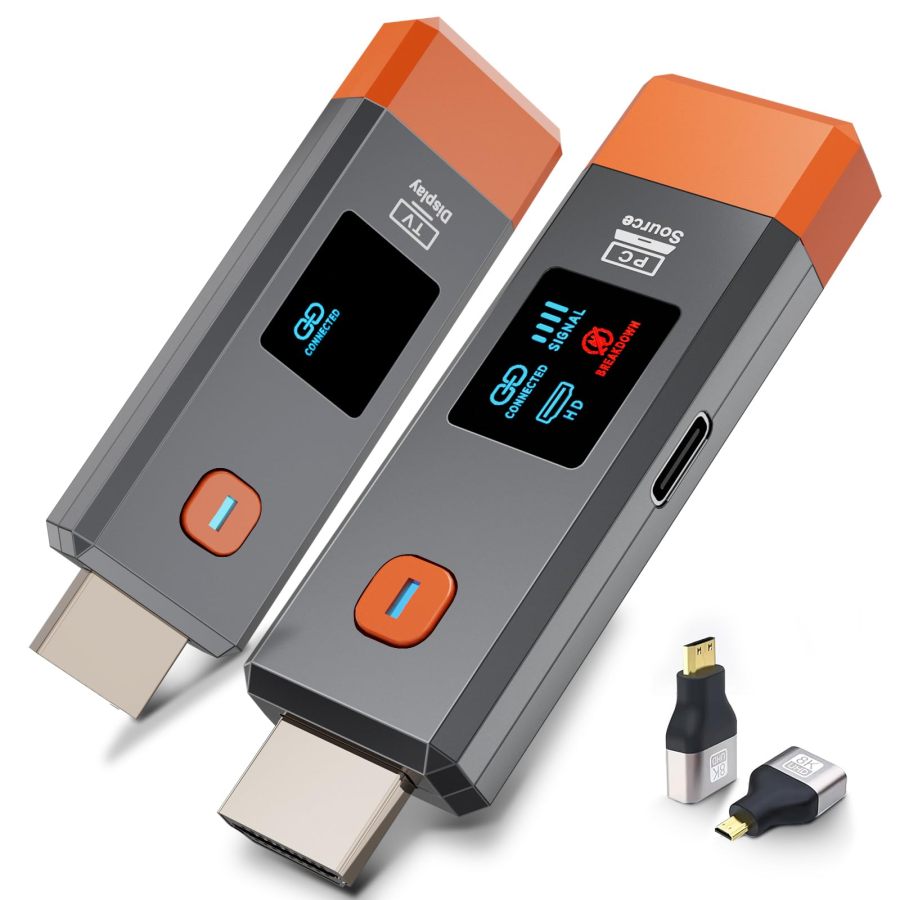
- Intuitive LED Status Display: The device body features an LED screen, displaying real-time connection status, signal strength, resolution, and other key information for user awareness.
3.4 Unmet Needs & Opportunities
-
True 4K Output Does Not Match Claims: Most products claim "4K decoding" but the actual output is only 1080P, causing users to fail to obtain expected native 4K picture quality when connecting to 4K display devices, leading to strong disappointment.
User Reviews (VOC) Customers report poor image quality with the adapter, mentioning issues with pixelation, artifacts, and graininess, with one customer noting that it does not display 4K on their 4K TV. // The instructions were poorly written and difficult to follow. The booklet itself was printed in extremely small text and crammed into a tiny format, making it frustrating to use. Even after taking the time to figure everything out and complete the installation, the product performed poorly-it was very laggy and unresponsive. Overall, a very disappointing experience.
-
HDCP Copyright Content Casting Restrictions: Numerous user feedback indicates inability to watch HDCP-protected streaming content like Netflix, Amazon Prime Video, Hulu through the adapter, severely limiting its use in home entertainment scenarios and resulting in missing functionality.
User Reviews (VOC) Note: This device does not support subscription payment applications with "HDCP" video copyright protection, such as Netflix, Amazon Prime Video, BT Sports, Sky Go, Hulu, Vudu, etc // It was disappointing I wished it would have worked but it would not work with my Motorola phone onto my fire TV I wished it would of it said I needed Google photos or Google TV or something but it wouldn't work with my devices.
-
Connection Stability and Latency Fluctuations: Despite marketing low latency and stable connections, many users report frequent disconnections, screen stuttering, and audio-video desynchronization, especially during cross-room or high-motion content playback, with user experience far below expectations.
User Reviews (VOC) Customers report significant connectivity issues with the streaming media player, noting that it never connects, has poor WiFi reception, and experiences frequent disconnections. // To much lag and lag between vid & sound. Went in the bin
-
Poor Compatibility with Specific Devices: Some products explicitly state they do not support specific devices like Google Pixel, Motorola, or Chromebooks, or have compatibility issues with Fire TV, rendering them unusable for some users after purchase.
User Reviews (VOC) Note: This device does not support Google phones. // My Android phones connected, but my Windows computer didn't.
-
Unclear Setup Guidance or Requiring Extra Steps: Some products, despite claiming "plug-and-play," have complex actual setup processes, requiring installation of specific software, firmware updates, or have obscure manuals, causing user obstacles during initial use.
User Reviews (VOC) Customers have mixed experiences with setting up the display adapter, with some finding it easy to plug in while others report difficulties with installation. // It took about 5 minutes to get the adapter updated after installing the Miracast software on my phone to set it up, now I connect and display with it easily.
-
Heating Issues During Prolonged Use: Multiple products become noticeably hot after extended use, raising user concerns about device lifespan and safety, affecting continuous usage experience.
User Reviews (VOC) the usb charging wire gets me nervous with the heat generated whether you the tv power supply or the wall outlet. // The device may have insufficient power supply, please connect an external 5V/1A adapter if necessary.
IV. User Decision Drivers
4.1 Key Decision Factors
- Connection Stability and Reliability: Users care most about whether the connection is stable, enabling continuous smooth transmission and avoiding frequent disconnections or stuttering, which is the foundation for ensuring core functionality.
- Actual Picture Quality and A/V Sync: The actual output resolution clarity and ability to achieve audio-video synchronization directly impact the immersion and professionalism of viewing and presentations.
- Ease of Use and Setup Convenience: Whether it truly achieves plug-and-play, without complex setup, apps, or drivers, lowering the user learning curve and saving time.
- Broad Device Compatibility: Whether it is compatible with the user's existing mainstream phones, tablets, and laptops (iOS/Android/Windows/macOS), avoiding inability to use due to device incompatibility.
4.2 Secondary Decision Factors
- Transmission Range and Wall Penetration: In home or office environments, whether it supports stable transmission across rooms or over certain distances, increasing deployment flexibility.
- Support for HDCP Content: Whether it can play copyright-protected streaming content like Netflix, expanding entertainment choices and enhancing product value.
- Product Design and Portability: Whether the device is compact and lightweight, easy to carry and hide during installation, meeting mobile office and home tidiness needs.
- Additional Features and Accessories: Such as LED displays, PD charging, HDMI adapters, etc., which can enhance user experience and product applicability.
- Price and Brand: After core needs are met, price is an important consideration, while well-known brands (e.g., j5create, Microsoft) provide additional trust and credibility.
V. Selling Points & Competitive Landscape
5.1 Selling Point Analysis
5.1.1 Standard Features (Points of Parity)
- Plug-and-Play, No App/WiFi/Bluetooth Needed: Most products emphasize no complex setup, ready to use upon plugging in, aiming to address user pain points regarding cumbersome setup.
- Dual-Band (2.4G/5G) Wireless Transmission: Widespread use of dual-band technology, marketed for more stable, faster signal transmission to handle complex wireless environments.
- Multi-Platform/Protocol Compatibility: Broadly supports Miracast, AirPlay, DLNA, compatible with mainstream devices like iOS, Android, Windows, macOS.
- 1080P HD Output (Includes 4K Decoding): Most products claim to support 4K decoding and provide 1080P HD output as a basic picture quality guarantee.
- Portable Compact Design: Products are designed to be small and lightweight, emphasizing ease of portability for various mobile scenarios.
5.1.2 Key Differentiators
- Ultra-Long Transmission Range (50m/100m): Some products emphasize their ultra-long transmission range, claiming up to 50m indoors and 100m outdoors, and the ability to penetrate walls.
- HDCP Copyright Content Support: A few products explicitly or implicitly state support for playing copyright-protected streaming content like Netflix, Prime Video (though actual verification is complex).
- LED Status Display Screen: Some products are equipped with an LED screen, displaying real-time connection status, signal strength, and other information, enhancing the visual operation experience.
- USB-C PD Charging Function: Very few products integrate PD charging, allowing laptop power supply while casting, achieving multi-functionality with one cable.
- Diverse Adapter Accessories: Some products include various adapters like Mini/Micro HDMI, USB-C to HDMI, enhancing device compatibility.
5.1.3 Unique Selling Propositions (USPs)
- Microsoft Brand Official Certification (for Miracast): Microsoft's own 4K Wireless Display Adapter emphasizes seamless integration and reliability with Windows and Surface devices, but at a high price.
- ZeroDrop Technology / Dynamic Stability Equalizer Engine: Proprietary technologies claimed by brands like BRAIDOL, aiming to provide zero-latency, ultra-stable wireless transmission experiences.
5.2 Competitive Landscape
5.2.1 Market Maturity
The wireless display adapter category is in a stage of rapid development and intense competition. Market products have become largely homogeneous in core functionality (plug-and-play, multi-protocol compatibility, HD output). However, significant differences and pain points remain in performance (true 4K, HDCP support, transmission stability, low latency) and user experience details, leading to polarized user reviews. The price range varies from $20 to $100, with lower-priced products often compromising on performance, while higher-priced products face challenges of high user expectations and value-for-money considerations.
5.2.2 Innovation Trends
Future innovation trends will focus on enhancing the user experience towards "seamlessness" and "intelligence." Specifically, this includes: achieving true end-to-end 4K@60Hz output and fully supporting HDCP copyright-protected content; further optimizing wireless transmission protocols to ensure ultra-low latency and ultra-high stability in complex environments; integrating smarter power management and interface expansion features (e.g., PD charging); and improving long-term usability and compatibility through more intuitive user interfaces (e.g., LED displays) and more robust firmware update mechanisms.
VI. Marketing Claims vs. Reality Check
The table below analyzes the gap between common marketing claims and actual user experiences in this category:
| Dimension | Marketing Claim | User Reality | Verdict |
|---|---|---|---|
| Resolution Claims | Supports 4K HD output for an ultimate visual experience. | Most products claim "4K decoding input," but the actual output resolution is only 1080P, or users report pixelated, grainy images, failing to achieve native 4K display on large screens. | Typical marketing leveraging the "4K" concept without clearly distinguishing between "decoding" and "output," creating false user expectations about actual performance. This constitutes wordplay and functional misdirection. |
| Streaming Service Compatibility | Widely compatible with mainstream streaming platforms for big-screen entertainment. | The vast majority of products explicitly or implicitly state they do not support HDCP-protected streaming content like Netflix, Amazon Prime Video, Hulu, preventing users from watching their primary paid content. | Sellers adopt vague or restrictive statements on a key feature, leading users to discover after purchase that their core entertainment needs cannot be met. This is the most severe disconnect between product functionality and user expectations. |
| Transmission Range and Wall Penetration | Ultra-long distance wireless transmission, can penetrate walls, stable signal without obstacles. | Users widely report severe signal attenuation, unstable connections, and transmission distances far below claimed ideal values in real-world environments with walls, obstacles, or strong interference sources, often with frequent disconnections. | Wireless signal wall penetration is limited by physical laws. Sellers over-exaggerate transmission distance in ideal environments, ignoring the impact of real-world complex environments on signal attenuation, misleading users about product applicability. |
| Plug-and-Play Convenience | No app, driver, or WiFi needed, truly plug-and-play, setup in three steps. | Some users report complex actual setup processes requiring installation of specific apps for firmware updates, or obscure manuals, even encountering devices that cannot connect, not matching the "plug-and-play" promise. | Sellers underestimate the user's psychological expectation for "plug-and-play." The hidden technical hurdles in the actual operation process undermine the product's core convenience selling point and increase user frustration. |
Key Takeaway: The market is generally plagued by "4K" parameter inflation, exaggerated transmission distance claims, and ambiguous HDCP compatibility, creating a significant gap between marketing promises and actual user experience, leading to damaged user trust.
VII. Supply-Demand Misalignment Analysis
The table below highlights mismatches between seller focus and buyer priorities:
| Dimension | Seller Behavior | User Focus | Verdict |
|---|---|---|---|
| "4K" Resolution | Widely promotes "4K decoding input" as a core selling point, implying users can get a 4K viewing experience. | User actual experience is mostly 1080P output, feeling disappointed by false 4K promises, considering the picture quality below expectations as the biggest marketing lie. | Sellers over-emphasize input decoding capability rather than the actual output picture quality users care most about, creating severe information asymmetry and a failure in user expectation management. |
| HDCP Copyright Content Compatibility | Most products adopt an evasive or explicitly non-supportive stance on HDCP compatibility, not developing or promoting it as a core feature. | Many users want to watch mainstream streaming services like Netflix on large screens and feel the product is functionally deficient due to the inability to cast, making it a key factor affecting purchase decisions and satisfaction. | Sellers fail to adequately meet users' core content consumption needs in home entertainment scenarios. HDCP compatibility has become a "collective blind spot" in the market, missing the premium opportunity with high-end user segments. |
| Connection Stability and Latency | Commonly markets "stable signal," "ultra-low latency," but fails to thoroughly resolve the high-frequency user feedback on disconnections, stuttering, and audio-video desynchronization in product design or technology. | Users' most basic requirement for wireless casting is stability and smoothness, but in actual experience, they frequently encounter connection interruptions and noticeable latency, severely affecting product usability. | Sellers fail to deliver on promises for the most core functional experience, leading to continuously declining user trust. This is the main reason for generally low ratings and concentrated negative reviews for products in this category. |
| Product Heating and Long-Term Reliability | Sellers generally overlook product heating issues during prolonged operation and lack sufficient commitment to long-term stable performance, with short warranty periods. | Users report devices becoming noticeably hot after extended use, even failing within a short period, raising concerns about product durability. | Sellers have shortcomings in product quality control and long-term reliability, leading to user concerns about product lifespan and safety, affecting repurchase and brand reputation. |
Key Takeaway: The market over-invests marketing resources in "4K" and "ultra-long range," while collectively overlooking users' core pain points regarding true HD output, HDCP content compatibility, and long-term connection stability.
VIII. Strategic Opportunities & Recommendations
8.1 Achieve True 4K@60Hz Output and HDCP Compatibility
8.1.1 Target Audience & Pain Points
⚡️ Pain Points Addressed: True 4K output does not match claims, HDCP copyright content casting restrictions.
8.1.2 Action Plan
Adopt video processing chips supporting HDMI 2.0 or higher standards to ensure end-to-end 4K@60Hz output capability; obtain HDCP 2.2 or higher licensing and integrate corresponding encryption/decryption modules to guarantee mainstream streaming playback. Optimize thermal design to ensure stable operation over long periods.
| Tech Complexity | High |
| Cost Impact | High Impact |
| Trade-off Warning | Achieving true 4K@60Hz output and supporting HDCP requires more powerful chipsets, higher bandwidth, and more complex firmware, significantly increasing BOM costs, potentially leading to higher power consumption and heat generation, necessitating better thermal design. Additionally, HDCP licensing costs are high. |
| Price Band | Only viable above $99.99 |
8.1.3 Marketing Strategy
Create the concept of "Cinema-Grade Wireless Experience," emphasizing "True 4K Lossless Picture Quality" and "Full-Platform Streaming Freedom"; provide authoritative test reports comparing competitors' performance on 4K and HDCP content; highlight its professional-grade performance and premium entertainment value, targeting users pursuing the ultimate experience.
8.2 Enhance Connection Stability and Reduce Latency
8.2.1 Target Audience & Pain Points
⚡️ Pain Points Addressed: Connection stability and latency fluctuations, heating issues during prolonged use.
8.2.2 Action Plan
Upgrade to WiFi 6/6E modules, optimize antenna layout and signal processing algorithms to enhance anti-interference and wall penetration; adopt lower-power chipsets and efficient thermal materials to address heating issues. Incorporate intelligent channel selection and adaptive bitrate adjustment features in firmware.
| Tech Complexity | Medium |
| Cost Impact | Medium Impact |
| Trade-off Warning | Upgrading wireless modules and optimizing antenna design increases costs. More powerful chips may generate additional heat, requiring better thermal materials and structural design, but these improvements are crucial for user experience. |
| Price Band | Only viable above $49.99 |
8.2.3 Marketing Strategy
Emphasize the ultimate stable experience of "No Dropouts in Meetings, No Stuttering in Movies"; demonstrate the advantage of ultra-low latency (e.g., <50ms) in gaming and presentations through real test data; highlight "Military-Grade Stability, Farewell to Disconnection Woes," building a reliable, trustworthy brand image.
8.3 Optimize 'Plug-and-Play' Experience and Setup Guidance
8.3.1 Target Audience & Pain Points
⚡️ Pain Points Addressed: Unclear setup guidance or requiring extra steps, poor compatibility with specific devices.
8.3.2 Action Plan
Simplify the initial connection process to achieve true zero-configuration; provide multi-language, illustrated, clear, and easy-to-understand online/printed user manuals, quick start guides, and video tutorials. Proactively test and resolve compatibility issues with specific devices like Google Pixel, Motorola, etc.
| Tech Complexity | Low |
| Cost Impact | Low Impact |
| Trade-off Warning | Mainly involves software optimization, UI design, and documentation improvement, with minimal hardware cost impact. Increasing compatibility with more niche devices may require more R&D investment but helps expand market share. |
| Price Band | No Price Band Jump |
8.3.3 Marketing Strategy
Highlight the extremely simple operation experience of "Even grandparents can easily use it"; demonstrate its seamless connection in various complex device environments through user stories; emphasize "One-Click Casting, Worry-Free and Effortless," alleviating user concerns about technical barriers.